> For the complete documentation index, see [llms.txt](https://guides.gresb.com/llms.txt). Markdown versions of documentation pages are available by appending `.md` to page URLs; this page is available as [Markdown](https://guides.gresb.com/completing-gresb-assessments/completing-the-assessment/supporting-information/materiality-and-scoring-tool.md).
# Materiality and Scoring Tool
## What is the Tool?
The GRESB Infrastructure Materiality and Scoring Tools are Excel-based resources designed to help participants better understand the materiality-based scoring methodology used in the **GRESB Infrastructure Asset** and **Infrastructure Development Asset Assessment**. The tools replicate the structure and functionality of the GRESB Materiality Assessment and the scoring model, which allows participants to explore their materiality outcomes and maximum GRESB Scores for each indicator and perform what-if analyses to see how different inputs affect results.
This tool contains:
* **Instructions**: Provides step-by-step guidance on how to use the tool.
* **GRESB Materiality Assessment**: Determines the materiality of each issue evaluated by GRESB for different infrastructure sectors and assets
* **GRESB Scoring**: Simulates the GRESB Scoring Model and shows how different factors influence the GRESB Score based on their materiality
>
## How to Use the Tool
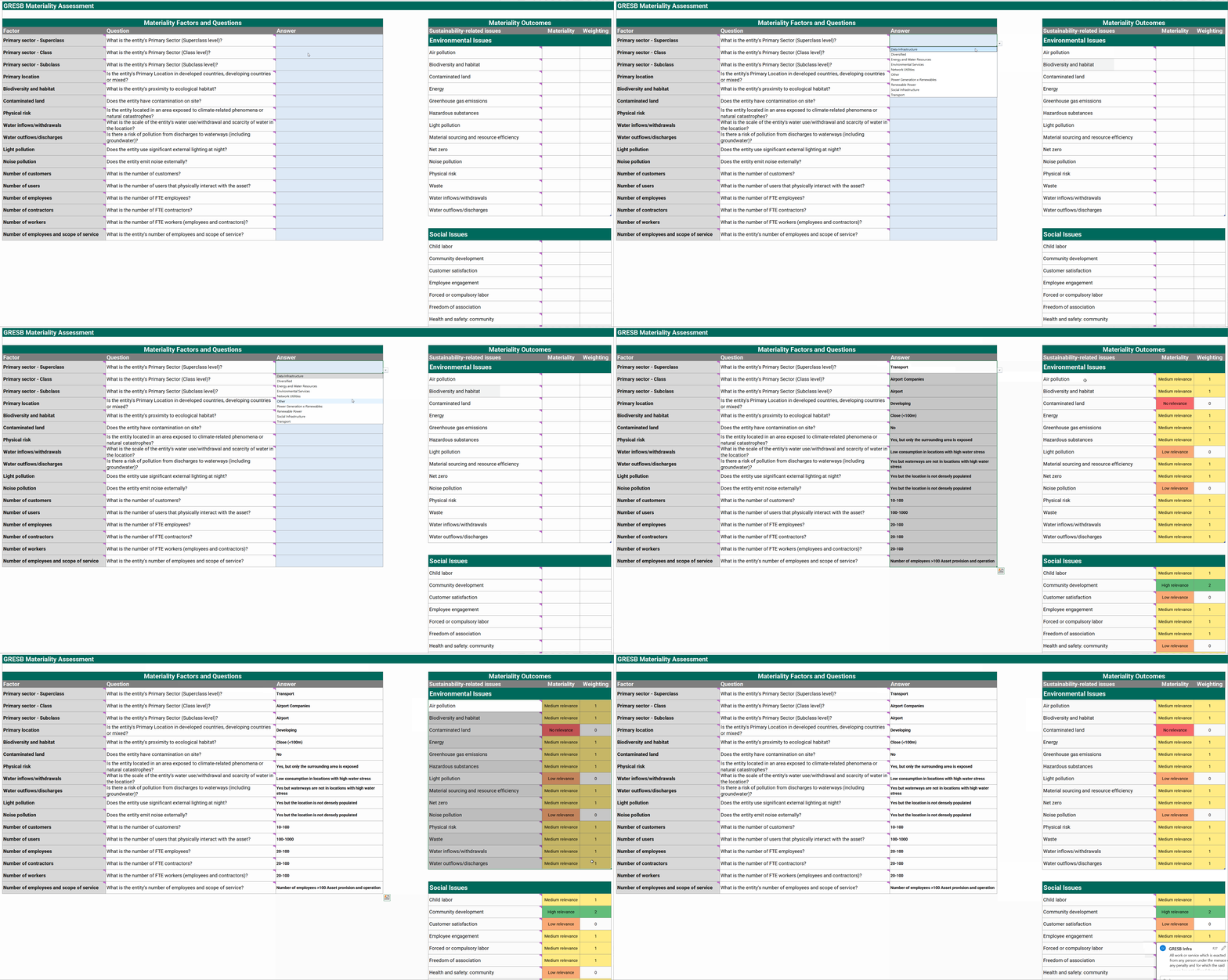
To get started, open the “GRESB Materiality Assessment” tab and use the dropdown lists to select Primary Sector, along with the other questions related to materiality factors (the same as those in indicator RC7). To generate materiality outcomes tailored to the asset, please answer all questions using the provided dropdown options.
Based on user responses, the tool will assign materiality levels for sustainability-related issues as follows:
* **0 – Low or no relevance**
* **1 – Medium relevance**
* **2 – High relevance**
These materiality outcomes determine the scoring weights applied to all materiality-based indicators. Users can view the maximum score assigned to each indicator in the “GRESB Scoring” tab.
#### **Example**
Assume an airport asset reporting under the Transport sector:
1. Fill in the materiality factors and questions in the GRESB Materiality Assessment tab (column C).
2. Review the resulting materiality outputs in columns E, F, and G of the same tab.
---
# Agent Instructions
This documentation is published with GitBook. GitBook is the documentation platform designed so that both humans and AI agents can read, navigate, and reason over technical content effectively. Learn more at gitbook.com.
## Querying This Documentation
If you need additional information that is not directly available in this page, you can query the documentation dynamically by asking a question.
Perform an HTTP GET request on the current page URL with the `ask` query parameter, and the optional `goal` query parameter:
```
GET https://guides.gresb.com/completing-gresb-assessments/completing-the-assessment/supporting-information/materiality-and-scoring-tool.md?ask=&goal=
```
`ask` is the immediate question: it should be specific, self-contained, and written in natural language.
`goal` is optional and describes the broader end goal you are ultimately trying to accomplish on behalf of the user. GitBook uses it to tailor the answer towards what is most useful for that goal.
The response will contain a direct answer to the question and relevant excerpts and sources from the documentation.
Use this mechanism when the answer is not explicitly present in the current page, you need clarification or additional context, or you want to retrieve related documentation sections.