> For the complete documentation index, see [llms.txt](https://guides.gresb.com/llms.txt). Markdown versions of documentation pages are available by appending `.md` to page URLs; this page is available as [Markdown](https://guides.gresb.com/completing-gresb-assessments/data/benchmark-report.md).

# Benchmark Report

How to Use Your 2026 Infrastructure Asset Benchmark Report

### Introduction <a href="#introduction" id="introduction"></a>

<details>

<summary>What is the Benchmark Report?</summary>

The GRESB Benchmark Report provides an in-depth analysis of the efficiency, resilience, and performance of a company, fund, or asset participating in the GRESB Assessments.

The report starts with the Scorecard—with GRESB Score, GRESB Rating, and a summary analysis of performance—and is followed by an indicator-by-indicator comparison of how you perform against your peers. It is designed to help participants identify areas of risk and opportunity and deepen engagement with their investors.

</details>

<details>

<summary>What can you use it for?</summary>

The Benchmark Report puts an asset's performance into context against comparable entities so participants and their stakeholders can decide where to act next. Common uses:

| If you want to…                                                                                                                                           | Start with…                                                                 |
| --------------------------------------------------------------------------------------------------------------------------------------------------------- | --------------------------------------------------------------------------- |
| **Evidence fundraising and capital allocation conversations** – show how sustainability performance compares to similar assets                            | Participation & GRESB Score, GRESB Rating, Rankings                         |
| **Compare on a consistent basis** – see how the entity performs against peers with similar sector, location, and scope of service                         | Peer Comparison, GRESB Model, Averages, Entity & Peer Group Characteristics |
| **Prioritize operational improvements** – find where performance on material issues such as energy, GHG, water, and health & safety lags peers            | Asset Impact, Aspects, Strengths, & Opportunities                           |
| **Understand what drives the score** – see which ESG dimensions and sustainability issues are material to the entity and how they are weighted            | GRESB Score Breakdown, Materiality                                          |
| **Monitor progress over time** – track performance and target trajectory across assessment years                                                          | Trend, Asset Impact                                                         |
| **Identify areas of underperformance** – pinpoint indicators where points were lost, evidence was not fully accepted, or reporting boundaries need review | Score Summary, Validation, Indicator Breakdown, Business Activities         |

</details>

<details>

<summary>What is new in the 2026 Benchmark Report?</summary>

GRESB introduced the following changes to the 2026 Benchmark Report. Aside from these changes, the Benchmark Report format and content remain consistent with the 2025 version.

* Scores in the *Scorecard* section are displayed to the first decimal place for greater transparency. All years in the timeline display to one decimal place, including years published earlier. A score previously shown as 100 may now appear as 99.7. The score itself has not changed, only the precision shown.
* The *Aspects, Strengths, and Opportunities* section now includes a view of the previous year's performance in each assessment Aspect to enable year-over-year comparison.
* Based on the Net Zero target data collected in indicator GH1, a new Net Zero Target Setting chart in the *Asset Impact* section visualizes the asset's pathway from its base year to its short-, medium-, and long-term targets, alongside its reporting year value.

</details>

<details>

<summary>How does an entity's component selection influence the output?</summary>

<table><thead><tr><th width="250.9295654296875"></th><th></th></tr></thead><tbody><tr><td>Management</td><td><ul><li>Asset Management Score</li></ul></td></tr><tr><td>Performance</td><td><ul><li>Asset Performance Score</li></ul></td></tr><tr><td>Management + Performance</td><td><ul><li>Asset Benchmark</li><li>Asset Score</li><li>Asset Star Rating</li><li>Asset Peer Group Ranking</li></ul></td></tr></tbody></table>

</details>

{% hint style="info" %}
The display examples provided in this document are for educational purposes only and have been simplified in some cases. They are intended to illustrate concepts and should not be considered definitive or comprehensive. Actual results may vary based on individual circumstances and factors.

Please [contact](mailto:info@gresb.com) the GRESB Member Success team with any questions.
{% endhint %}

***

{% columns %}
{% column width="50%" %}

#### <mark style="color:$primary;">GRESB Rating</mark>

<figure><img src="https://3125261017-files.gitbook.io/~/files/v0/b/gitbook-x-prod.appspot.com/o/spaces%2FpuhmrMAX3Y5D6ODFHo2L%2Fuploads%2FqebcztGkpyYpzPTmsOvk%2FScreenshot%202026-09-29%20at%2010.26.39.png?alt=media&amp;token=0bb1d439-67f1-4e5a-9b7a-dbe869fac661" alt=""><figcaption></figcaption></figure>

The GRESB Rating is based on the GRESB Score and its quintile position relative to all participants in the GRESB Assessment, with annual calibration of the model. If the entity is placed in the top quintile, it will be a GRESB 5 Star-rated entity; if it ranks in the bottom quintile, it will be a GRESB 1 Star-rated entity.
{% endcolumn %}

{% column width="50%" %}

#### <mark style="color:$primary;">Participation & GRESB Score</mark>

<figure><img src="https://3125261017-files.gitbook.io/~/files/v0/b/gitbook-x-prod.appspot.com/o/spaces%2FpuhmrMAX3Y5D6ODFHo2L%2Fuploads%2FdY2UVFppAX2HZ5XRTWm5%2FScreenshot%202026-09-29%20at%2010.26.50.png?alt=media&amp;token=f161f73b-5037-40e5-9c21-fa9e9b6f9f30" alt=""><figcaption></figcaption></figure>

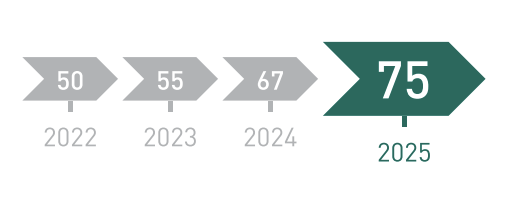
The GRESB Score is an absolute measure of the entity’s sustainability performance, out of 100 points. The Participation & Score timeline shows the entity’s GRESB Score across previous assessment years, highlighting its historical performance trend.
{% endcolumn %}
{% endcolumns %}

{% hint style="info" %}
If the entity opted into the Grace Period (available for first-year participants), no GRESB Investor Members will access its Benchmark Report. The results of the Grace Period year will not be visible in subsequent reports.
{% endhint %}

### <i class="fa-code-compare">:code-compare:</i> <mark style="color:$primary;">Peer Comparison</mark>

> **Use this section to** see how the entity compares to others with shared characteristics.

<div align="left"><figure><img src="https://3125261017-files.gitbook.io/~/files/v0/b/gitbook-x-prod.appspot.com/o/spaces%2FpuhmrMAX3Y5D6ODFHo2L%2Fuploads%2FHeKzBcdxyEhyl7C8S3df%2FScreenshot%202025-12-15%20at%2010.17.58.png?alt=media&amp;token=ac2cd08d-7314-4924-aa5c-8ac8c268600b" alt="" width="334"><figcaption></figcaption></figure></div>

GRESB assigns each participant to a peer group to contextualize their assessment results. Peer groups do not influence the GRESB Score, Star Rating, or points, but help to put the Benchmark\
Report insights into perspective.   

Peer groups are based on the entity’s sector, location, and scope of service. To ensure participant\
anonymity, GRESB will only create a peer group once there are at least six participants with similar\
characteristics (the participant and five other peers).

{% hint style="info" %}
GRESB carries out each entity’s peer group assignment process individually, meaning each entity’s peer\
group is uniquely its own. For example, while Entity A might have Entity B in its peer group, the reverse is\
not always true; Entity B might not have Entity A in its peer group.
{% endhint %}

**Note:** Peer groups are distinct from benchmark groups. Whereas benchmark groups refer generally to collections of entities, which vary based on context, GRESB creates one predefined peer group per Benchmark report using a standardized methodology.

See [here](https://guides.gresb.com/completing-gresb-assessments/data/benchmark-report/peer-group-creation) for more information about GRESB’s predefined peer group allocation process.

*\*Note for entities that complete only one component:* Participants who only submit one component are not eligible to receive a GRESB Score or GRESB Rating but will still be assigned a peer group.

### <i class="fa-ranking-star">:ranking-star:</i> <mark style="color:$primary;">Rankings</mark>

> **Use this section to** position the entity's results within the sector, region, and ownership segments most relevant to it.

<figure><img src="https://3125261017-files.gitbook.io/~/files/v0/b/gitbook-x-prod.appspot.com/o/spaces%2FpuhmrMAX3Y5D6ODFHo2L%2Fuploads%2FsyX32uayUxF45C9VdUzN%2FScreenshot%202025-12-09%20at%2014.13.32.png?alt=media&amp;token=e46208b1-a299-4bd6-9a9e-6f0c85c34cb2" alt=""><figcaption></figcaption></figure>

In addition to the peer comparison, GRESB provides a broad range of additional rankings by comparing participants’ scores against various benchmarks.

This approach aligns with the comparative nature of the Benchmark Report and helps contextualize scores by comparing them against participants with similar geographical, sectoral, and ownership style criteria.

In some cases, one or more of the ranking badges may be greyed out. This happens when there are not enough entities in that respective ranking category.

### <i class="fa-chart-scatter">:chart-scatter:</i> <mark style="color:$primary;">GRESB Model</mark>

> **Use this section to** see where the entity sits relative to this year's star-rating cutoffs and the score range of the next rating.

<div align="left"><figure><img src="https://3125261017-files.gitbook.io/~/files/v0/b/gitbook-x-prod.appspot.com/o/spaces%2FpuhmrMAX3Y5D6ODFHo2L%2Fuploads%2FdqImBjujKpkWNid8fGgJ%2FScreenshot%202025-12-09%20at%2014.23.17.png?alt=media&amp;token=29c151a2-dd83-4c8c-9e98-8c0bca4f69ca" alt="" width="563"><figcaption></figcaption></figure></div>

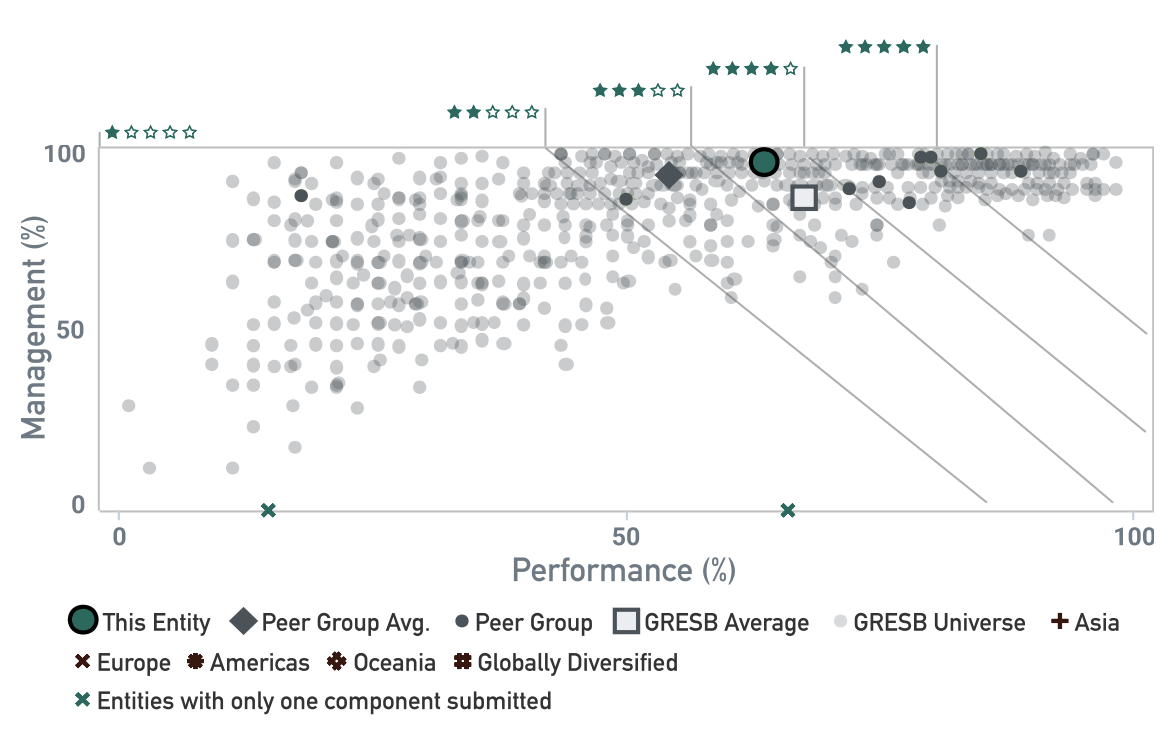
The GRESB Model is an interactive chart\* that displays the GRESB Scores of all entities that submitted the Management and Performance Component. The scores of participants who only complete one component are shown along either side of the model's axes. The four diagonal lines represent the star rating cutoffs, indicating where each entity falls within the relative quintiles.

Hovering over the stars above the graph reveals the score ranges corresponding to each star rating. Entity names remain confidential, unless the participant opted to disclose their name and score to other participants. By opting to disclose its score, that entity gains access to the names and scores of other participants who also chose to share this information.

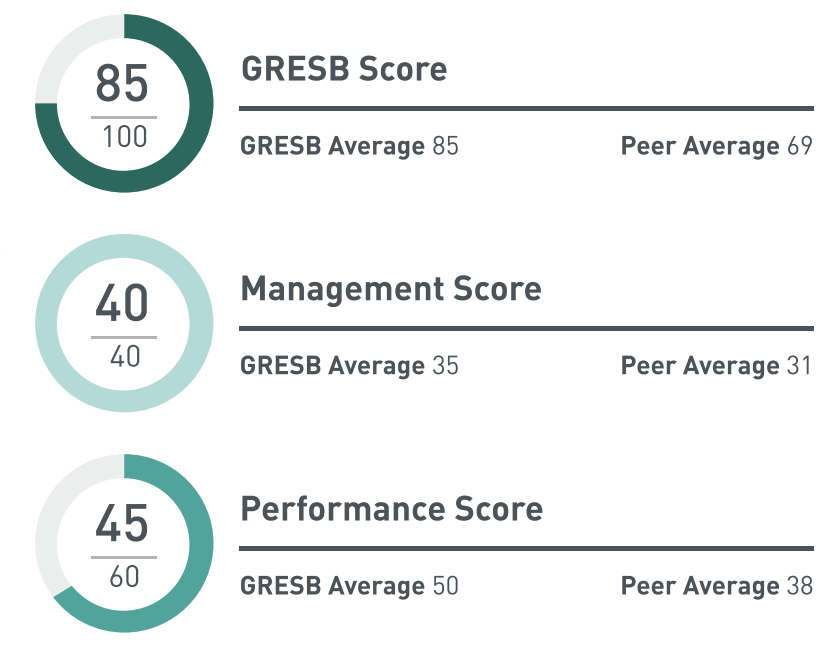
The sum of all indicator scores (on the right hand side) totals 100 points. The Management Component accounts for 40 points, while the Performance Component contributes 60 points.

*\*Note that the interactive chart feature is available exclusively when accessing the Benchmark Report through the Portal. This functionality is not available in the PDF version of the report.*

### <i class="fa-circle-notch">:circle-notch:</i> <mark style="color:$primary;">GRESB Average, Benchmark Average, & Peer Average</mark>

> **Use this section to** judge whether a score gap is specific to the entity or could reflect the wider market.

{% columns %}
{% column %}

<figure><img src="https://3125261017-files.gitbook.io/~/files/v0/b/gitbook-x-prod.appspot.com/o/spaces%2FpuhmrMAX3Y5D6ODFHo2L%2Fuploads%2F0mS3oFCSnyDkmm8GyNBD%2FScreenshot%202026-09-29%20at%2010.26.59.png?alt=media&amp;token=51a6946f-a4ea-4bd4-8081-6f4329ec3abe" alt=""><figcaption></figcaption></figure>
{% endcolumn %}

{% column %}
The **GRESB Average** is the average score of all GRESB Universe entities within the\
same Benchmark (i.e., Asset Benchmark = Management + Performance component\
participants).

The **Peer Average** is the average score of all entities within one’s peer group, which\
are shown in the Entity and Peer Characteristics section.

The **Benchmark Average** is the average score of all entities sharing similar\
characteristics within a component.
{% endcolumn %}
{% endcolumns %}

**Component Benchmark Averages:**

* For the **Management** Component, this refers to the average scores of entities within the same geography, nature of ownership, and scope of service.
* For the **Performance** Component, the benchmark average would include the average scores of all entities grouped according to a similar sector, geography, nature of ownership, and scope of service.

{% hint style="info" %}
GRESB rounds scores in the Benchmark Report to one decimal place. Each figure is rounded independently from its full value, so individual figures may not sum exactly to the total.
{% endhint %}

### <i class="fa-leaf">:leaf:</i> <mark style="color:$primary;">GRESB Score Breakdown</mark>

> **Use this section to** see whether the entity's score is being shaped more by environmental, social, or governance performance.

<figure><img src="https://3125261017-files.gitbook.io/~/files/v0/b/gitbook-x-prod.appspot.com/o/spaces%2FpuhmrMAX3Y5D6ODFHo2L%2Fuploads%2FuMZs5ADwxvTcPiB9NwKV%2FScreenshot%202026-09-29%20at%2010.27.14.png?alt=media&amp;token=b6a76cff-35a2-415a-bf12-b1f1b3036697" alt=""><figcaption></figcaption></figure>

Each indicator is allocated to one of the three dimensions (E- Environmental; S- Social; G- Governance):

* **Environmental** indicators are related to actions and efficiency measures undertaken in order to monitor and decrease the environmental footprint of the portfolio.
* **Social** indicators are related to the entity’s relationship with and impact on its stakeholders and direct social impact of its activities.
* **Governance** indicators are related to the governance of environmental, financial, and operational sustainability policies, procedures and approach to sustainability at the entity level.

Participants may use the [GRESB Materiality and Scoring Tool](broken://spaces/wuadr7MsN62OLa7z5hLK/pages/42qnOyhGR7874fJrbvWm) to identify the weight of E, S, and G issues based on their specific asset characteristics.

{% hint style="info" %}
Find each indicator's E, S, and G designation within the aspect-level pages of [Completing GRESB Assessments](broken://spaces/GXz9Z0rFp0i3rxrvupmM).
{% endhint %}

### <i class="fa-arrow-trend-up">:arrow-trend-up:</i> <mark style="color:$primary;">Trend</mark>

> **Use this section to** show progress across years of participation, and identify where methodological evolution might affect year-over-year comparability.

<figure><img src="https://3125261017-files.gitbook.io/~/files/v0/b/gitbook-x-prod.appspot.com/o/spaces%2FpuhmrMAX3Y5D6ODFHo2L%2Fuploads%2FNaPnyBkrc9bHdQRoDg3z%2Fimage.png?alt=media&amp;token=ce44db10-8fcc-4d42-98b5-40b85bc9936b" alt=""><figcaption></figcaption></figure>

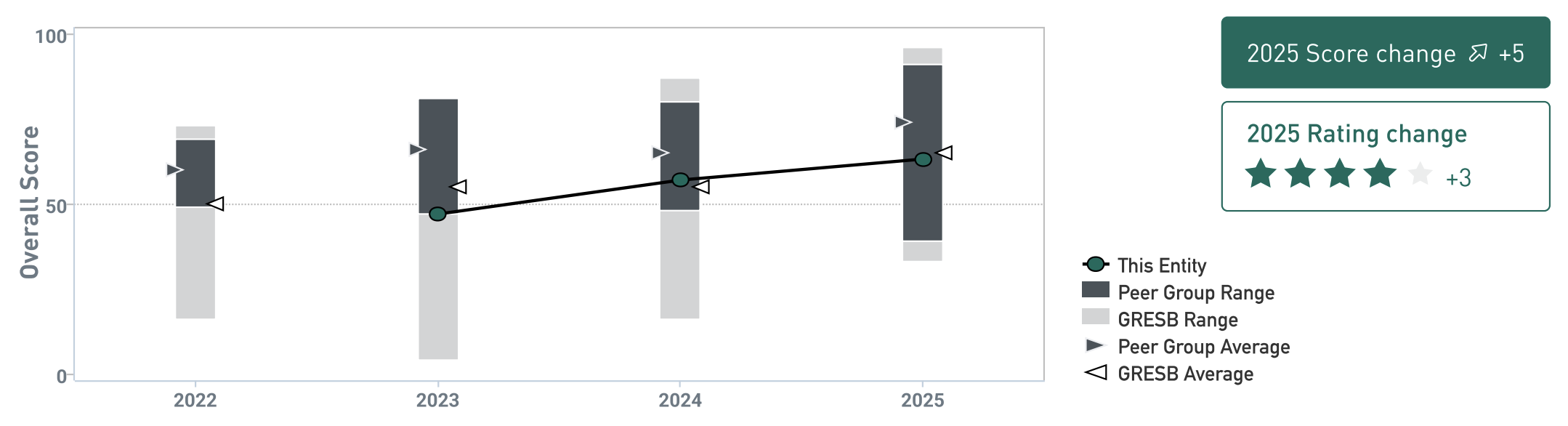
The trend graph shows the entity’s score progression across each year of participation. It also includes historical performance metrics such as the GRESB Range (i.e., lowest and highest scores achieved) and average scores for the GRESB Universe and peer group.

The graph will highlight the entity’s Grace Period year (if any) to indicate its participation status, but will not reveal the entity’s performance that year. If the entity opted into the Grace Period in the previous reporting year, this section does not include a score or rating change between the current and previous year.

### <i class="fa-flower-tulip">:flower-tulip:</i> <mark style="color:$primary;">Aspects, Strengths, & Opportunities</mark>

> **Use this section to** decide which aspects to prioritize and direct resources towards first.

{% columns %}
{% column width="50%" %}

<figure><img src="https://3125261017-files.gitbook.io/~/files/v0/b/gitbook-x-prod.appspot.com/o/spaces%2FpuhmrMAX3Y5D6ODFHo2L%2Fuploads%2F6o9EevtCkIy32Kl0XpFA%2FScreenshot%202025-12-09%20at%2014.49.33.png?alt=media&amp;token=900f782b-4f98-43af-83c0-1b8e3bf440a6" alt=""><figcaption></figcaption></figure>
{% endcolumn %}

{% column width="50%" %}
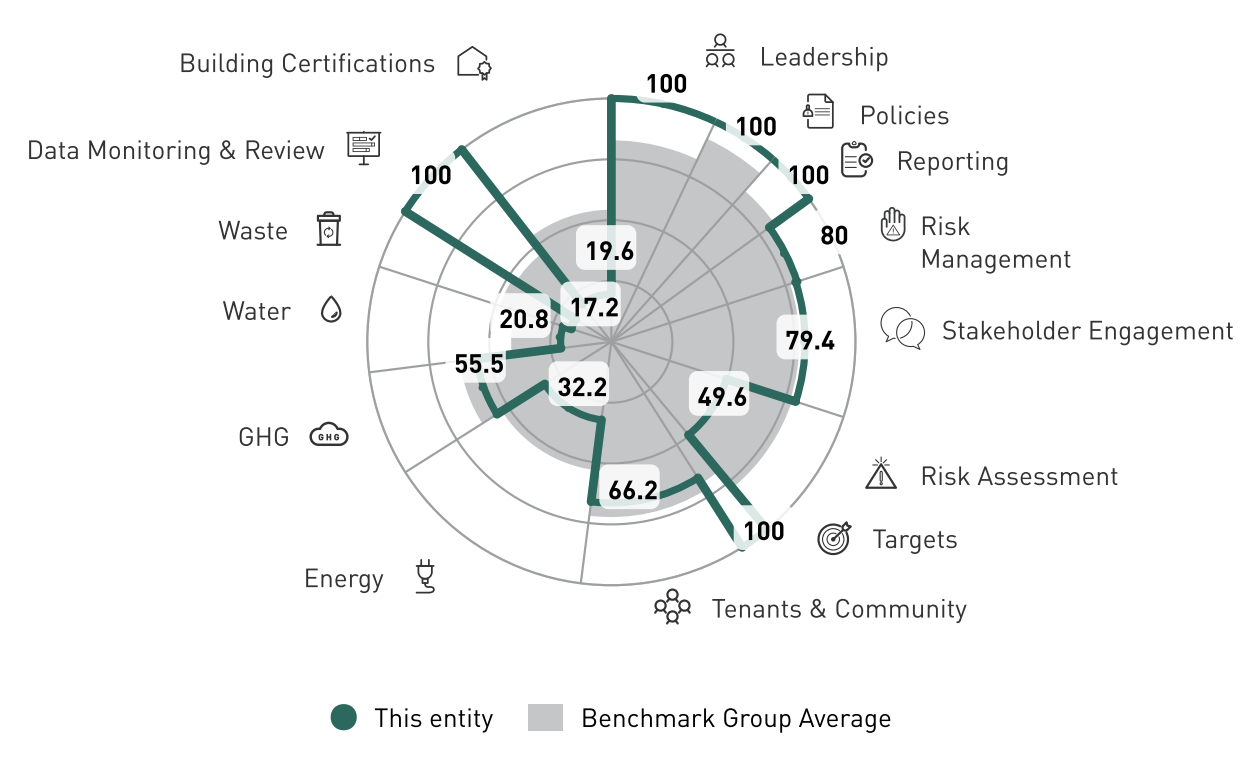
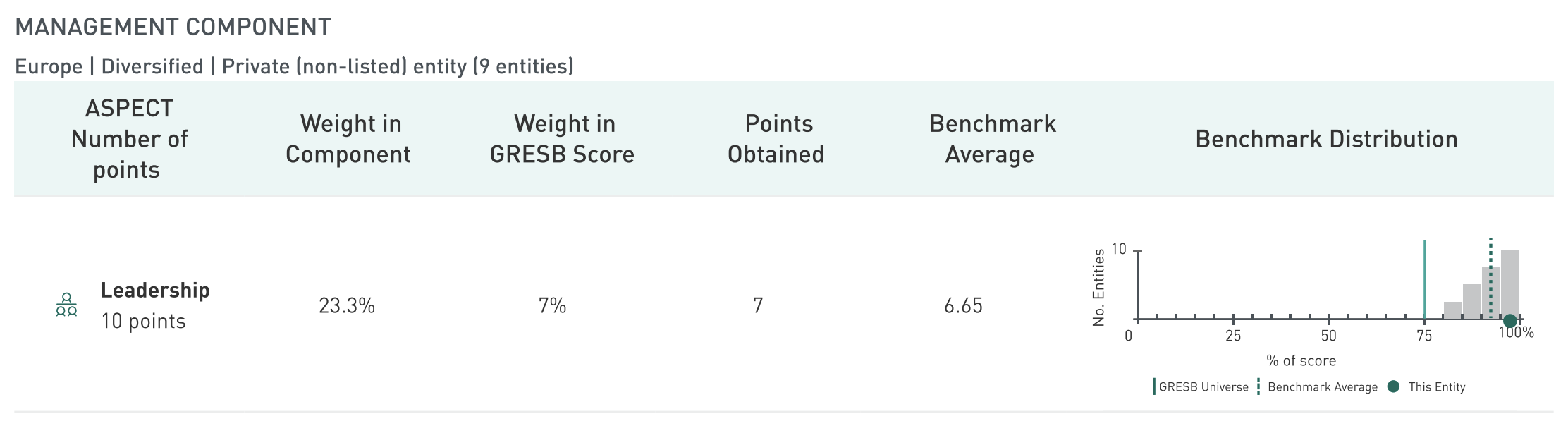
The Aspects, Strengths, & Opportunities rose graph is an interactive tool that shows how the entity’s performance in each Aspect (e.g., Reporting, Risk Management) compares to that of its benchmark group for the **current** and **previous** reporting years.

Along with the tables below, the graph provides a high-level overview of which areas the entity performs well in and which it could improve upon. This can help readers of the Benchmark Report direct their attention before delving further into the entity’s underlying results.
{% endcolumn %}
{% endcolumns %}

<figure><img src="https://3125261017-files.gitbook.io/~/files/v0/b/gitbook-x-prod.appspot.com/o/spaces%2FpuhmrMAX3Y5D6ODFHo2L%2Fuploads%2F7ANVpa1Cpg7DjKfOgkKQ%2FScreenshot%202025-12-15%20at%2011.40.58.png?alt=media&amp;token=fbb7f378-278d-45db-b07a-7c34444770ad" alt=""><figcaption></figcaption></figure>

The Management Component consists of five Aspects, and the Performance Component consists of up to twelve Aspects (depending on the asset’s materiality results). The tables below outline each Aspect, the points earned for each, and their respective weight within the overall Component and GRESB Score. For the Performance Component, Aspects with little or no material relevance to the asset are excluded from scoring logic.

The interactive Benchmark Distribution graph on the right side of the table reveals the entity’s score per Aspect compared to the GRESB Universe and Peer Group Averages. The grey bars represent the distribution of entities within the corresponding benchmark group.

***Note:** The benchmark group characteristics are displayed above the table’s header.*

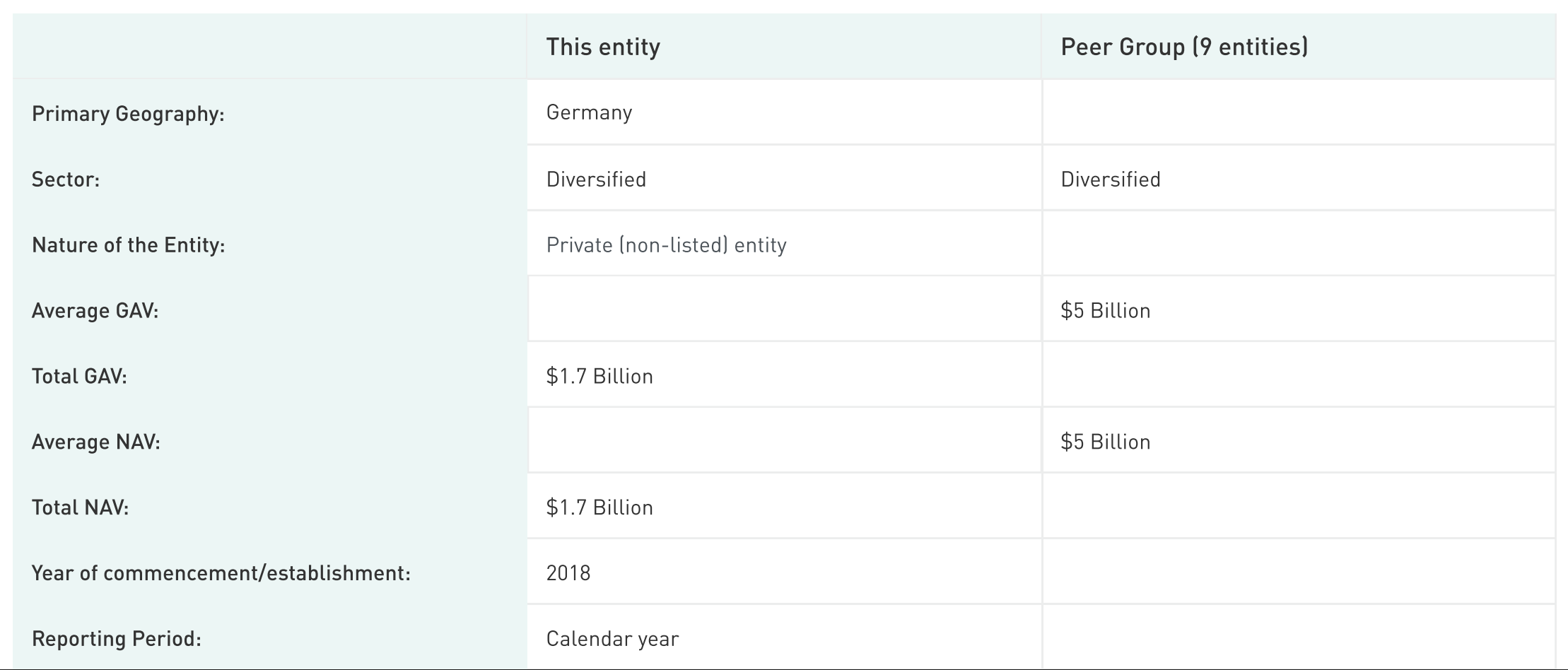
### <i class="fa-id-badge">:id-badge:</i> <mark style="color:$primary;">Entity & Peer Group Characteristics</mark>

> **Use this section to** learn more about the peers an entity is being compared against.

<div align="left"><figure><img src="https://3125261017-files.gitbook.io/~/files/v0/b/gitbook-x-prod.appspot.com/o/spaces%2FpuhmrMAX3Y5D6ODFHo2L%2Fuploads%2FXMRcuC2Y1rGxdvBq7dv7%2FScreenshot%202025-12-15%20at%2011.42.43.png?alt=media&amp;token=95d7bb55-beee-4e29-9ae2-cbe566e61f50" alt=""><figcaption></figcaption></figure></div>

This section provides an overview of the entity and its peer group. See the [Peer Group Allocation Methodology](broken://pages/iDVa0OChokOqCpzAoiiL) for more information on peer group creation.

### <i class="fa-building">:building:</i> <mark style="color:$primary;">Business Activities</mark>

> **Use this section to** see how reported facilities shape the entity's primary sector and location, and what to update in RC3 before the entity's next submission if its facilities change.

<figure><img src="https://3125261017-files.gitbook.io/~/files/v0/b/gitbook-x-prod.appspot.com/o/spaces%2FpuhmrMAX3Y5D6ODFHo2L%2Fuploads%2FSkNq4CQBhxQU1Dpz8rcL%2FScreenshot%202025-12-15%20at%2011.46.23.png?alt=media&amp;token=1f8d57ee-9250-4012-ac1f-dfb5cd3793c2" alt=""><figcaption></figcaption></figure>

This section displays the list of facilities, as reported to indicator RC3 of the assessment, that make up the asset. The asset’s underlying facilities determine its primary sector and location. This can help readers of the Benchmark Report better understand the asset’s reporting boundaries.

### <i class="fa-square-check">:square-check:</i> <mark style="color:$primary;">Validation</mark>

> **Use this section to** see which evidence was not fully accepted and what to address before the entity's next submission.

<figure><img src="https://3125261017-files.gitbook.io/~/files/v0/b/gitbook-x-prod.appspot.com/o/spaces%2FpuhmrMAX3Y5D6ODFHo2L%2Fuploads%2F3R0EHprtt1Rj3QyHFM2r%2FScreenshot%202025-12-15%20at%2011.48.01.png?alt=media&amp;token=d3ab3cce-5dac-47de-9cb2-0e3649ec4476" alt=""><figcaption></figcaption></figure>

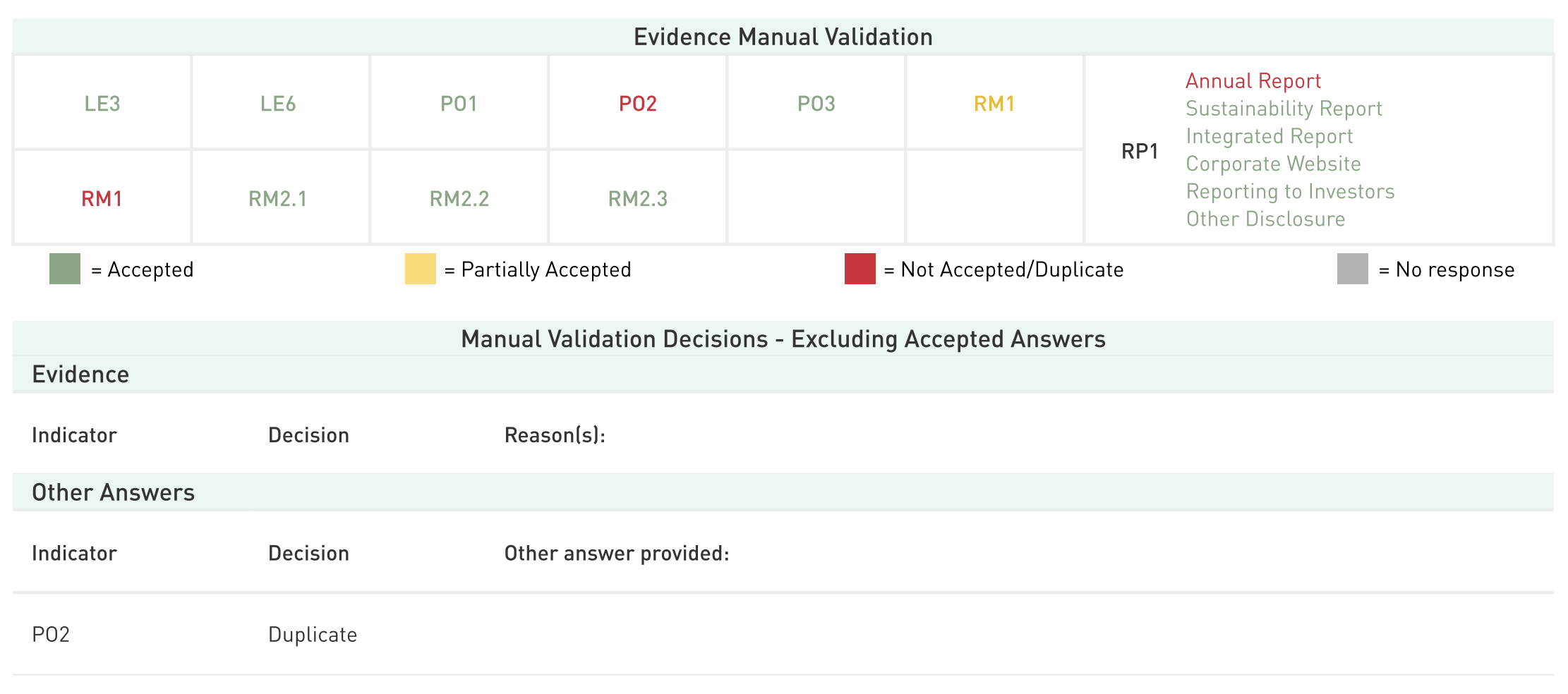
[GRESB validation](broken://spaces/wuadr7MsN62OLa7z5hLK/pages/SbyIZR3DwtXvJRcoPz0h) verifies the existence, completeness, accuracy, and logic of data submitted to the GRESB Assessments. GRESB conducts both automatic and manual validation.

*The Evidence: Manual Validation* table summarizes the validation decisions of all manually validated indicators.

For manually validated indicators that require multiple validation decisions depending on the entity’s selections (e.g., PO1, RP1), the table reveals the outcome of each possible selection.

Lastly, the table provides a brief explanation for any indicators that received less than a fully accepted decision (for evidence and ‘Other’ answers).

### <mark style="color:$primary;">Materiality</mark>

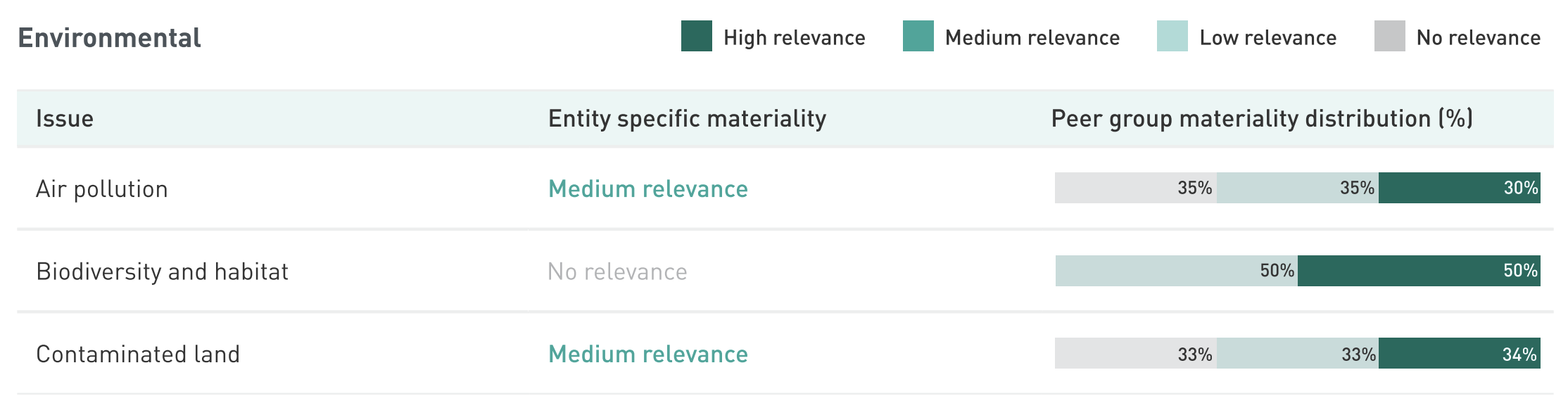
> **Use this section to** see which sustainability issues are material to the entity and how its materiality results compare with its peer group.

<figure><img src="https://3125261017-files.gitbook.io/~/files/v0/b/gitbook-x-prod.appspot.com/o/spaces%2FpuhmrMAX3Y5D6ODFHo2L%2Fuploads%2F2E8HBPBmxoB26WQysBtj%2FScreenshot%202025-12-11%20at%2017.41.29.png?alt=media&amp;token=fd6d3c61-b3d5-4373-8f31-484b0a7cc2f9" alt=""><figcaption></figcaption></figure>

The Materiality table provides an overview of the sustainability issues deemed material to the reporting entity, determined by the asset’s Reporting Characteristics (RC2-5, RC7).

The table allows for comparison between the materiality results of the reporting entity and those of its peer group. For more information on the materiality levels and how they are considered in scoring, please refer to the [Materiality Page](broken://spaces/wuadr7MsN62OLa7z5hLK/pages/42qnOyhGR7874fJrbvWm).

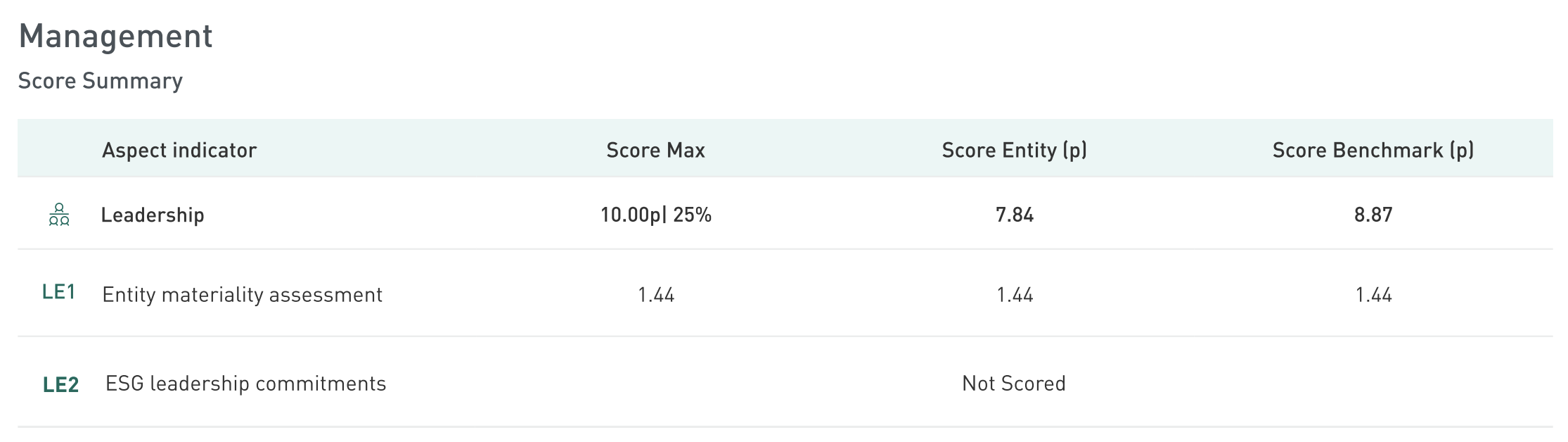
### <i class="fa-medal">:medal:</i> <mark style="color:$primary;">Score Summary</mark>

> **Use this section to** pinpoint aspects and indicators where the entity may trail the Management and Performance Component benchmarks.

<figure><img src="https://3125261017-files.gitbook.io/~/files/v0/b/gitbook-x-prod.appspot.com/o/spaces%2FpuhmrMAX3Y5D6ODFHo2L%2Fuploads%2FiOIY5R4LJBTIt4Ed8ONS%2FScreenshot%202025-12-15%20at%2011.51.24.png?alt=media&amp;token=499398b4-4b33-40b4-ac9e-b01ac5d20da8" alt=""><figcaption></figcaption></figure>

The Score Summary table details the number of points the entity earned per indicator. The maximum points and their weight within the overall component are listed alongside each Aspect title. This section also reveals the entity’s score relative to the component level benchmark on an indicator-by-indicator basis. This can help with identifying more precise improvement opportunities.

### <mark style="color:$primary;">Indicator Breakdown</mark>

> **Use this section to** spot practices common across the benchmark that the entity doesn't yet report.

<figure><img src="https://3125261017-files.gitbook.io/~/files/v0/b/gitbook-x-prod.appspot.com/o/spaces%2FpuhmrMAX3Y5D6ODFHo2L%2Fuploads%2FnRWAyyPVPbcBtK51gtzP%2FScreenshot%202025-12-10%20at%2011.42.10.png?alt=media&amp;token=fc8a84f0-373d-41eb-8722-65dbc979bf74" alt=""><figcaption></figcaption></figure>

Every indicator can be answered with ‘Yes‘, ‘No’ and ‘Not applicable’ in some cases. From a scoring perspective, ‘Not applicable’ is considered the same way as ‘No’ and will yield 0 points. The header displays the points achieved per indicator.

The percentage bars located next to the indicator’s answers reflect the benchmark’s selection. This can help the asset compare its responses to those of similar entities; if the majority of an asset’s benchmark\
group selected something that it did not, this can reveal a specific and achievable opportunity to align with peer leaders.

### <mark style="color:$primary;">Asset Impact</mark>

> **Use this section to** put the entity's performance on material sustainability issues into context against its peer group.

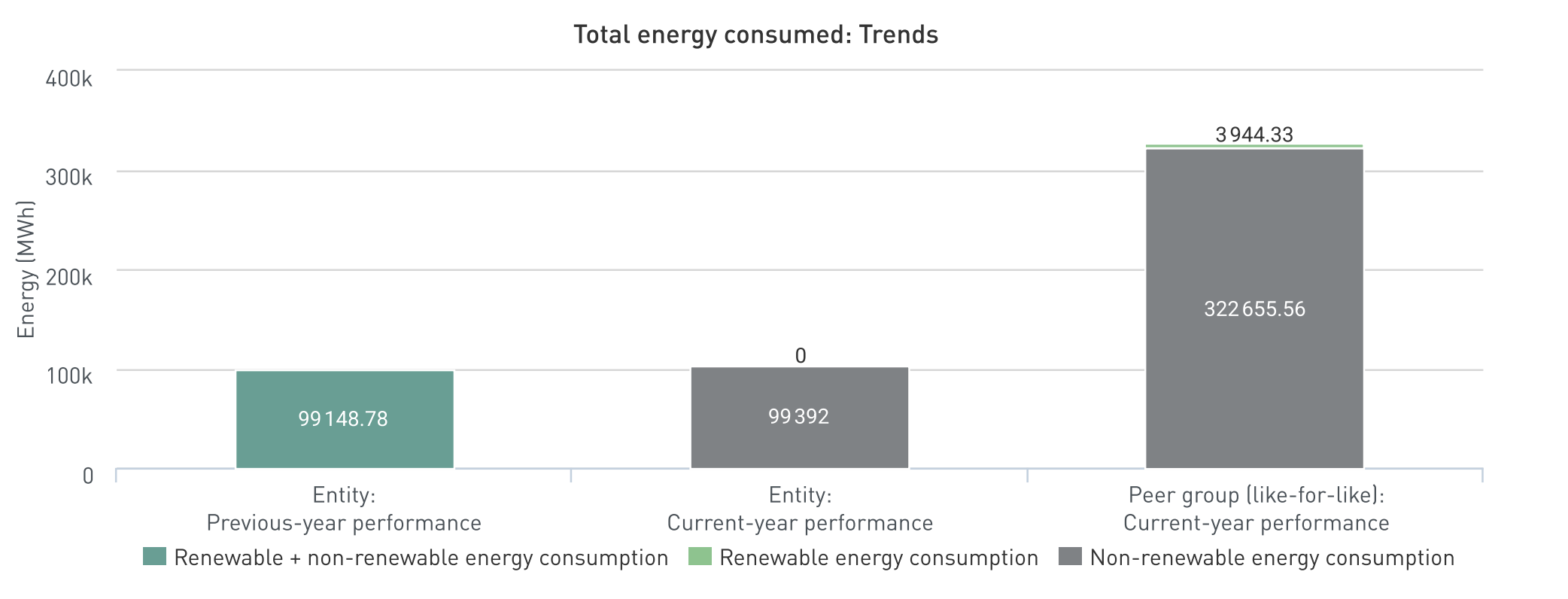
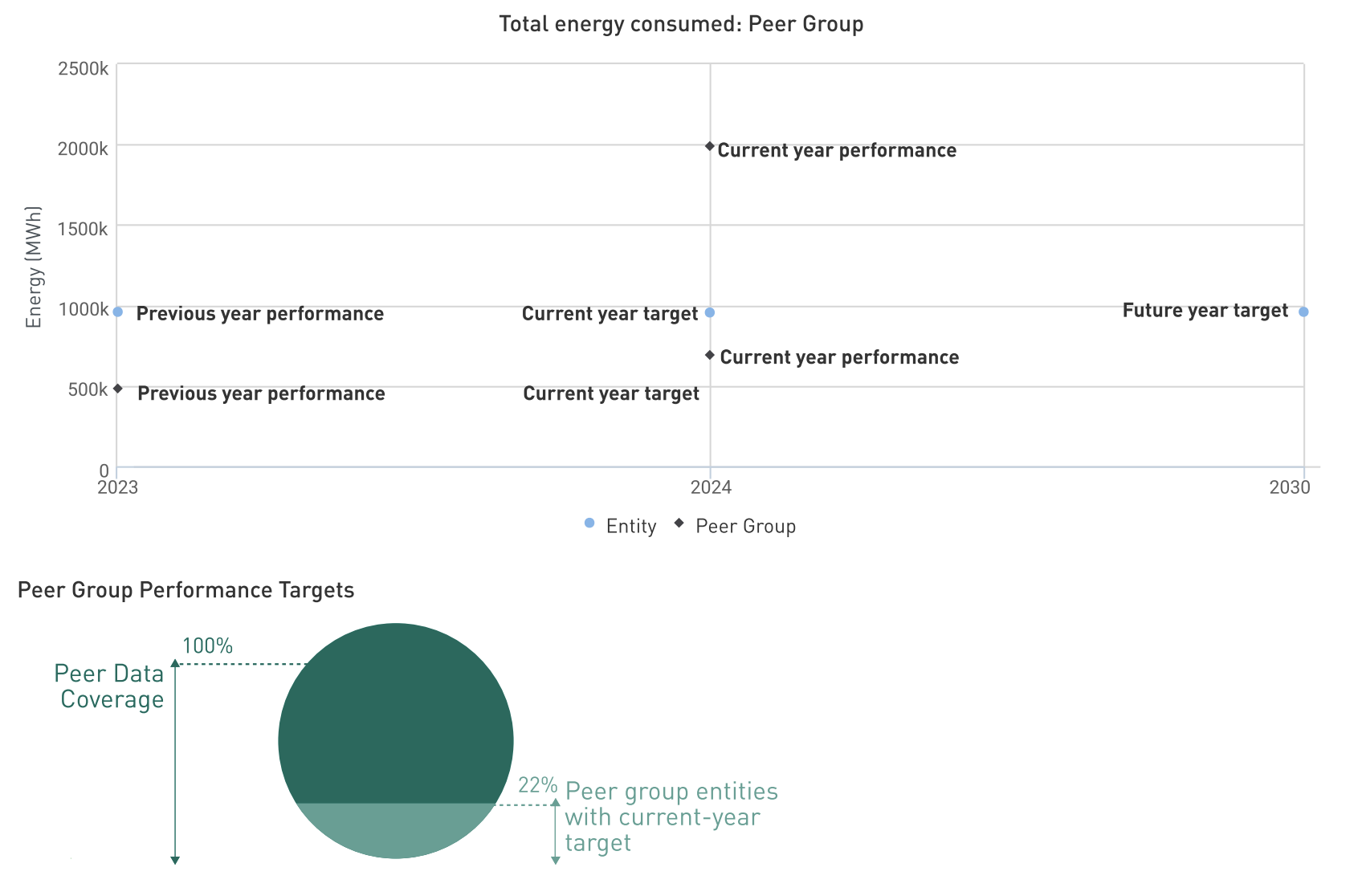
<figure><img src="https://3125261017-files.gitbook.io/~/files/v0/b/gitbook-x-prod.appspot.com/o/spaces%2FpuhmrMAX3Y5D6ODFHo2L%2Fuploads%2FOiLmvdtSswnWcfSN5JIC%2FScreenshot%202025-12-15%20at%2011.57.10.png?alt=media&amp;token=9221a18d-7834-4ce1-975f-66d70856841e" alt=""><figcaption></figcaption></figure>

This section offers an overview of the asset’s sustainability performance data for the reporting year. The issues reflected in this section are Energy, GHG, Air Pollution, Water, Waste, Biodiversity, Health & Safety (Employees and Contractors), and Diversity (Governance bodies and Employees). Non-material sustainability issues will include the note Entity and peers did not complete the indicator. Peer group insights contextualize the entity’s performance but do not influence its scores.  

Note that intensity calculations will only include assets that reported complete data coverage. Otherwise, the intensity graphics will note the incompletion.

<figure><img src="https://3125261017-files.gitbook.io/~/files/v0/b/gitbook-x-prod.appspot.com/o/spaces%2FpuhmrMAX3Y5D6ODFHo2L%2Fuploads%2FRzC3ZwusMwhyzMimp51u%2FScreenshot%202025-12-15%20at%2011.57.31.png?alt=media&amp;token=6036001c-2783-4d3e-8ffc-7a8659dde94c" alt=""><figcaption></figcaption></figure>

Under the GHG section, the Net Zero Target Setting chart shows the asset's pathway from its base year to its short-, medium-, and long-term targets, as reported in indicator GH1. The asset's reporting year value is also shown, so you can see where it currently sits relative to that pathway.

The panel next to the chart summarizes the target's scope, the Scope 2 accounting method, and the reporting year emissions by scope.

The chart appears only when the asset reported a Net Zero target in GH1 with a base year value, a reporting year value, and at least two target values.

<figure><img src="https://3125261017-files.gitbook.io/~/files/v0/b/gitbook-x-prod.appspot.com/o/spaces%2FpuhmrMAX3Y5D6ODFHo2L%2Fuploads%2FyR4tOmPX72bPbeTj2Ly7%2FScreenshot%202026-09-29%20at%2010.52.42.png?alt=media&amp;token=4a0bba0b-b261-4c0a-a959-3b70e5b5f1b0" alt=""><figcaption></figcaption></figure>


---

# Agent Instructions
This documentation is published with GitBook. GitBook is the documentation platform designed so that both humans and AI agents can read, navigate, and reason over technical content effectively. Learn more at gitbook.com.

## Querying This Documentation
If you need additional information that is not directly available in this page, you can query the documentation by asking a question.

Perform an HTTP GET request on the following URL with the `ask` and `goal` query parameters:

```
GET https://guides.gresb.com/completing-gresb-assessments/data/benchmark-report.md?ask=<question>&goal=<user_goal>
```

`ask` is the immediate question: it should be specific, self-contained, and written in natural language.
`goal` is what the user is ultimately trying to achieve, the reason they need the answer. Sharing it helps GitBook give you a better, more relevant answer. A goal is most helpful when it describes the outcome the user wants rather than restating the question. For example, with `ask=how do I create an API token`, a goal like `automate deployments from our CI pipeline` lets GitBook tailor the answer to that use case.

The response will contain a direct answer to the question and relevant excerpts and sources from the documentation.

Use this mechanism when the answer is not explicitly present in the current page, you need clarification or additional context, or you want to retrieve related documentation sections.