> For the complete documentation index, see [llms.txt](https://guides.gresb.com/llms.txt). Markdown versions of documentation pages are available by appending `.md` to page URLs; this page is available as [Markdown](https://guides.gresb.com/fund/prepare/scoring-basics.md).
# Scoring Basics
Each GRESB Infrastructure Assessment indicator is assigned a specific scoring weight.
The maximum score an entity can achieve for each indicator depends on several factors, with the scoring process incorporating [scoring weights](#scoring-weights) and [score multipliers.](#multipliers)
{% hint style="warning" %}
**It is not possible to estimate the GRESB Score due to the influence of validation decisions.**
{% endhint %}
## Scoring Weights
For some indicators, scoring is based solely on the cumulative sum of the scoring weights assigned to the indicator's elements. These weights, displayed in red on the left side of each indicator, represent the allocation of total available points per indicator according to the priorities established by the GRESB Foundation, aligning with market trends and sustainability best practices.
Oftentimes, not all elements within an indicator need to be selected to achieve full points. If the sum of weights exceeds the indicator's maximum score, the score will be capped at that maximum.
Scoring Weight Formulas and Examples
***Example with multiple sub-options:***
* Indicator score =
* \[ (Sum of scoring weights) ] × (Maximum score for the indicator)
**Indicator LE3 \[Asset Assessment] – sustainability, climate-related and/or Human Capital senior decision maker (1.65 points).**
The indicator consists of three main options: ‘Sustainability,’ ‘Climate-related risks and opportunities,’ and ‘Human Capital.’ Sustainability, for example, carries a weight of (3/5). Within each main option, there are several sub-options (i.e., Board of directors, C-suite level staff), each assigned its own weight.
In the case of LE3, each sub-option contributes a scoring weight of 1. If an entity chooses one element under ‘Sustainability,’ one element under ‘Climate-related risks and opportunities,’ and one element under ‘Human Capital’, the calculation would read as:
**Note:** Diminished scoring may influence sub-options’ scoring weights. See this section below for more information.
## Diminishing Increase in Scoring
For other indicators, diminishing scoring impacts the assigned scoring weight of the options and sub-options. When applicable, the scoring document represents this with a **blue line** next to the selections’ fractional weights.
Diminished Scoring Method and Examples
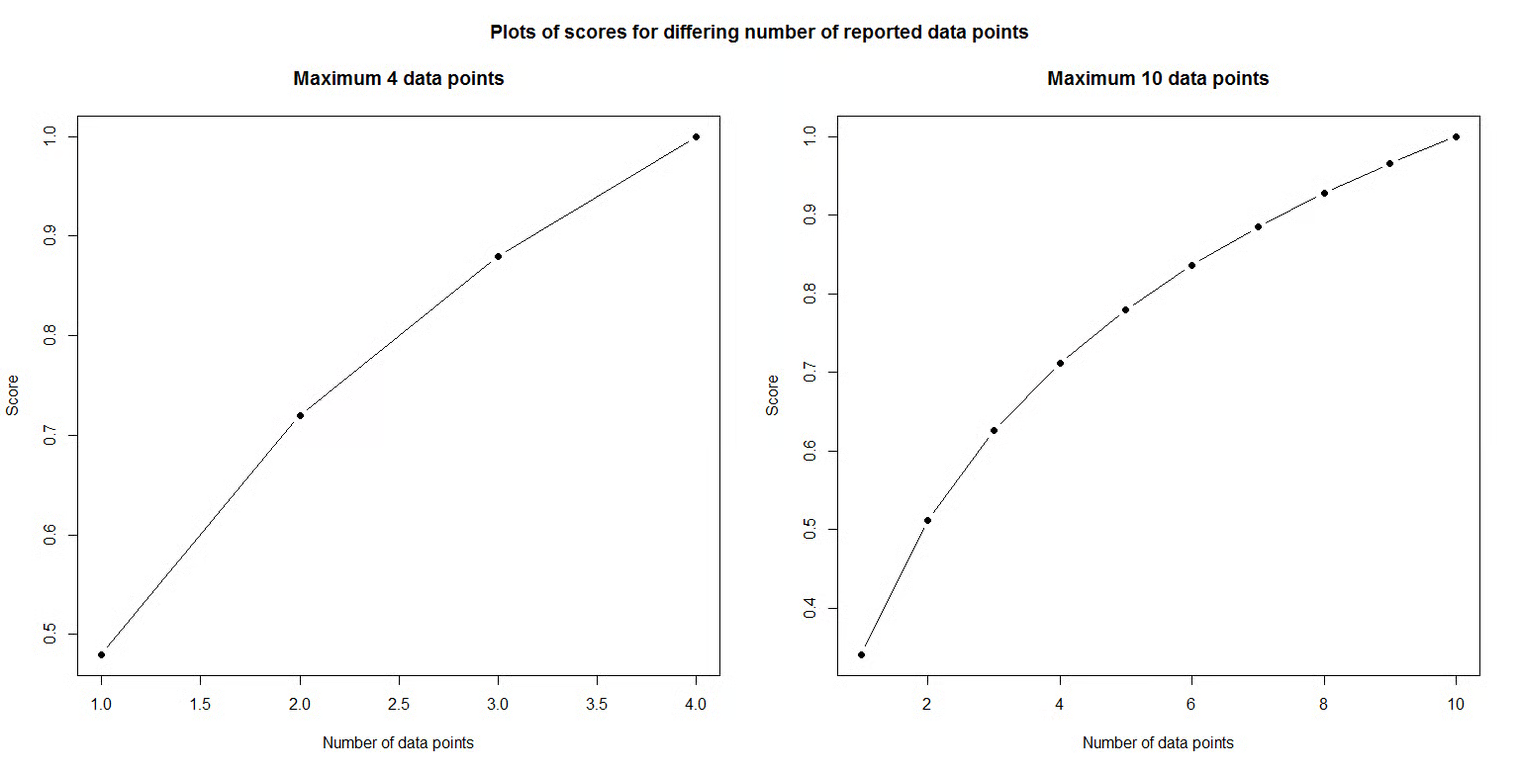
The idea behind this concept is that the fractional score achieved for each additional data point provided decreases as the number of provided data points increases.
This means that the fractional score achieved for the first data point will be higher than the fractional score achieved for the second, which again will be higher than for the third, and so on.
In this approach, the full assigned scoring weight is only achieved per selection if the entity selects the minimum number of required elements.
In indicator SE1, for example, selecting ‘Clients/customers’ as an applicable stakeholder will only earn a 1/5 scoring weight if the entity selects five stakeholder groups. Otherwise, the scoring weight of this selection would be a logarithmic function of the fractional score.
\
## Multipliers
#### Validation Status Multipliers
For indicators subject to manual validation, the evidence’s validation status acts as a multiplier to determine the indicator’s final score.
If supporting evidence for indicators is fully accepted, it results in applying the full multiplier (100%) to the indicator's score. If supporting evidence is partially accepted, it results in a reduced multiplier (50%). If the evidence is not accepted, the multiplier is set to 0, regardless of the original selection’s predefined scoring weight. Indicators and responses subject to manual validation can be found in the [Validation](/fund/completing-the-assessment/supporting-information/data-quality-and-validation.md) page.
Validation Multiplier Example
For indicators with a validation multiplier, the final score is calculated using the following formula:
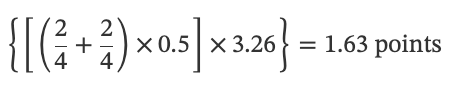
**Indicator Score = ((Sum of scoring weights) × (Multiplier)) × (Maximum score for the indicator)**
**Example:** Indicator *LE4 \[Asset Assessment] - Personnel Sustainability Performance Targets* (3.26 points). Each selected personnel group contributes a specific scoring weight. It is mandatory to upload evidence that supports the entity’s selections. The evidence’s validation status (i.e., accepted, partially accepted, or not accepted) is associated with a scoring weight used as a multiplier to determine the final score.
If an entity chooses ‘Sustainability managers’ and ‘Investment analysts’ but its evidence is given a *partially accepted* validation status (multiplier: 0.5), the calculation would be as follows:
## Fund GRESB Scores
There are two GRESB Scores that infrastructure funds can earn, each out of 100 points:
* **Fund** (*operational*) **Score** = Management Score (30 Points) + Performance Score (70 Points)
* **Fund Development Score** = Management Score (30 Points) + Development Score (70 Points)
#### **Management Score**
All funds that complete the Fund Assessment earn a Management Score.
#### **Performance and Development Scores**
The Fund Performance and Development Scores are weighted averages of the GRESB Scores obtained by the underlying assets (as listed in indicator RC6) within their respective Infrastructure Asset/Development Asset Assessments.
Eligibility Criteria
To receive a *Fund Performance Score* and/or *Fund Development Score*, at least 25% of the fund’s underlying assets (based on equity invested) must participate in a GRESB Infrastructure Assessment and **be connected to the fund on the GRESB Portal.**
* To earn a Performance Score, at least one asset within that 25% must complete the Asset Assessment.
* To earn a Development Score, at least one asset within that 25% must complete the Development Asset Assessment.
**Note:** If fewer than 25% of assets participate in the GRESB Assessment, the Fund will only receive a Management Score. This rule also applies to funds using the “New Fund Participant” exclusion reason.
GRESB Fund Score Calculation Considerations
1. Non-reporting assets, or assets without a 'Confirmed’ connection status, will receive a score of **zero** for the purposes of calculating the Fund Performance/Development Score.
2. Funds are entitled to exclude specific assets from contributing to their Performance/Development Score if there is a valid reason. The weights of excluded assets will be redistributed among the remaining assets. Refer to indicator [RC6](broken://spaces/wuadr7MsN62OLa7z5hLK/pages/AD4q69AzXceIEK3MBBh7) for further details on valid exclusion reasons.
* First-time Fund Assessment participants can exclude any assets from scoring using the "New Fund Participant" exclusion reason, under the following conditions:
* The fund must increase asset participation in the second year of reporting for this exclusion reason to remain valid.
* If using the “New Fund Participant” exclusion reason, the fund’s coverage level will be displayed alongside the score in the Scorecard summary of the Fund Benchmark Report, and it will be highlighted in the Benchmark Report when a fund is using this exclusion reason.
* Funds that use the "New Fund Participant" asset exclusion will **not** be eligible for Sector Leader awards.
* This weighted average score **excludes** the scores of assets that used a Grace Period.
{% hint style="info" %}
For info on establishing fund-asset connections in the GRESB Portal, refer to the [Assessment Portal Guide.](/fund/prepare/assessment-portal-guide.md)
{% endhint %}
## Additional Considerations
Open text boxes are not used for scoring but are intended for additional reporting or explanatory purposes.
---
# Agent Instructions
This documentation is published with GitBook. GitBook is the documentation platform designed so that both humans and AI agents can read, navigate, and reason over technical content effectively. Learn more at gitbook.com.
## Querying This Documentation
If you need additional information that is not directly available in this page, you can query the documentation dynamically by asking a question.
Perform an HTTP GET request on the current page URL with the `ask` query parameter, and the optional `goal` query parameter:
```
GET https://guides.gresb.com/fund/prepare/scoring-basics.md?ask=&goal=
```
`ask` is the immediate question: it should be specific, self-contained, and written in natural language.
`goal` is optional and describes the broader end goal you are ultimately trying to accomplish on behalf of the user. GitBook uses it to tailor the answer towards what is most useful for that goal.
The response will contain a direct answer to the question and relevant excerpts and sources from the documentation.
Use this mechanism when the answer is not explicitly present in the current page, you need clarification or additional context, or you want to retrieve related documentation sections.