> For the complete documentation index, see [llms.txt](https://guides.gresb.com/llms.txt). Markdown versions of documentation pages are available by appending `.md` to page URLs; this page is available as [Markdown](https://guides.gresb.com/fundamentals/getting-started/scoring-basics.md).
# Scoring Basics
Understand the details of GRESB's scoring methodology.
Participants must earn at least **80%** of points available (14.6 out of 18.25 points) to achieve Fundamentals. The assessment scoring process is fully automated based on the methodology outlined on this page.
It includes several key principles:
{% hint style="info" %}
**It is not possible to estimate the Fundamentals results due to the influence of validation decisions.**
{% endhint %}
## Scoring Weights
How does weighted scoring work?
For some indicators, scoring is based solely on the cumulative sum of the scoring weights assigned to the indicator's elements. These weights, displayed in red on the left side of each indicator, represent the allocation of total available points per indicator according to the priorities established by the GRESB Foundation, aligning with market trends and sustainability best practices.
Oftentimes, not all elements within an indicator need to be selected to achieve full points. If the sum of weights exceeds the indicator's maximum score, the score will be capped at that maximum.
Formulas and Examples
***Example without sub-options:***
* Indicator score =
$$\text{Indicator score} = \left( \text{Sum of Selected Fractions} \right) \times \left( \text{Maximum score for the indicator} \right)$$
**Indicator LE3 - Sustainability Taskforce/Committee (1 point)**
Each task force member type contributes a specific scoring weight; governing bodies and leadership roles hold a scoring weight of 3/8, and investment and professional roles hold a scoring weight of 2/8.
If an entity chooses two governing bodies and one professional, the calculation will read as follows:
***Example with multiple sub-options:***
When indicators have options and sub-options, the scoring weight for each sub-option is first summed, and the resulting value is multiplied by the main fraction assigned to the main option. The final score is the cumulative sum of these weighted sub-options across all main options within the indicator, multiplied by the indicator's maximum points.
* Indicator score =
* \[ (Sum of the sub-option scoring weights for each main option) × (Main option weight for each option) ] × Maximum score for the indicator
**Indicator SE6 - Supply Chain Engagement Program (1.5 points)**
The indicator consists of three main options, each carrying an equal weight of 1/3. Within each main option, there are several sub-options, each with its own assigned weight.
If an entity chooses four elements within the supply chain engagement program, four topics, and two external parties to whom the requirements apply, the calculation would read as:
$$\left{\left\[\left(\frac{1}{4}\times4\right)\times\frac{1}{3}\right] + \left\[\left(\frac{1}{4}\times4\right)\times\frac{1}{3}\right] + \left\[\left(\frac{1}{2}\times2\right)\times\frac{1}{3}\right]\right}\times1.5 = 1.5\ \text{points}$$
## Multipliers
How do scoring multipliers work?
The score of some indicators is further adjusted by applying multipliers that either increase or decrease the indicator’s score. Multipliers are classified into different categories:
### **Validation Status**
For selections subject to manual validation, the validation status acts as a multiplier to determine that selection's final scoring weight.
* If the supporting evidence is **Accepted**, the selection multiplier is set to 1, and its pre-defined weight does not change.
* If the supporting evidence is **Not Accepted**, the selection multiplier is set to 0, and the selection contributes zero points, regardless of its predefined scoring weight.
Indicators subject to manual validation are listed [here](/fundamentals/getting-started/data-quality-and-validation.md#summary-of-indicator-specific-requirements).
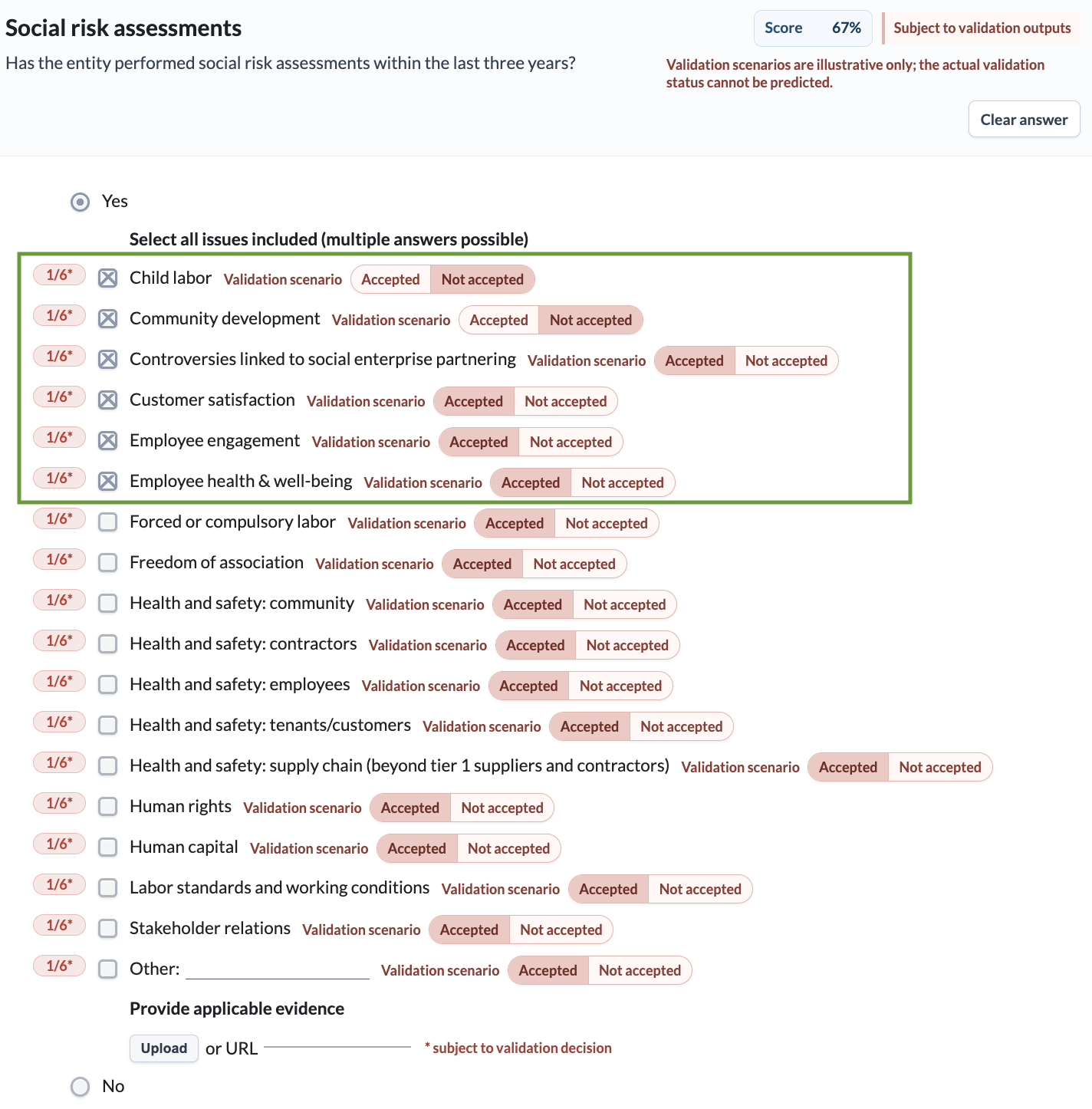
#### Example: *Indicator RM3.1 (Social Risk Assessments)*
Each selection contributes a **predefined** scoring weight (e.g., *Child labor* is worth 1/6).
It is mandatory to upload evidence. The evidence validation status (Accepted = 1, Not Accepted = 0) is applied as a multiplier to each selection.
***Scenario:***
If an entity selects six options, but **two are not found in evidence**:
* Two unaccepted selections each earn scoring weight of 0
* Four accepted selections each earn scoring weight of 1/6
$$Score = \left(\frac{1}{6} + \frac{1}{6} + \frac{1}{6} + \frac{1}{6} + 0 + 0\right) \times 0.25 = 0.168 \text{ points}$$
Formulas and Examples
*Multiplier Example*
For indicators with a single multiplier, the final score is calculated using the following formula:
**Indicator score = \[ (Sum of scoring weights) × Multiplier ] × Maximum score for the indicator**
Example: Indicator PO2 - Social Policies (1.5 Points)
Each selected social issue contributes specific scoring weight (1/6). It is mandatory to upload evidence that supports the entity’s selections. The evidence’s validation status (i.e., accepted, partially accepted or not accepted) is associated with a scoring weight that is used as a multiplier to determine the final score.
If an entity chooses six social issues included in the policy, but its evidence is given a partially accepted validation status (multiplier: 0.5), the calculation would be as follows:
$$((\frac{1}{6} + \frac{1}{6} + \frac{1}{6} + \frac{1}{6} + \frac{1}{6} + \frac{1}{6}) \times 0.5) \times 1.5 = 0.75$$
## Static Scoring
What is static scoring?
GRESB scores **all indicators** in the Fundamentals Assessment using static weights, meaning predefined values are used to assess a portfolio's performance.
The points assigned to an indicator are fixed based on the number of selections chosen and the corresponding multipliers, where applicable.
The scoring outcome remains unaffected by the participant's relative performance compared to its benchmark group. Instead, these indicators are assessed based on whether the participant meets certain predefined criteria.
---
# Agent Instructions
This documentation is published with GitBook. GitBook is the documentation platform designed so that both humans and AI agents can read, navigate, and reason over technical content effectively. Learn more at gitbook.com.
## Querying This Documentation
If you need additional information that is not directly available in this page, you can query the documentation dynamically by asking a question.
Perform an HTTP GET request on the current page URL with the `ask` query parameter, and the optional `goal` query parameter:
```
GET https://guides.gresb.com/fundamentals/getting-started/scoring-basics.md?ask=&goal=
```
`ask` is the immediate question: it should be specific, self-contained, and written in natural language.
`goal` is optional and describes the broader end goal you are ultimately trying to accomplish on behalf of the user. GitBook uses it to tailor the answer towards what is most useful for that goal.
The response will contain a direct answer to the question and relevant excerpts and sources from the documentation.
Use this mechanism when the answer is not explicitly present in the current page, you need clarification or additional context, or you want to retrieve related documentation sections.