> For the complete documentation index, see [llms.txt](https://guides.gresb.com/llms.txt). Markdown versions of documentation pages are available by appending `.md` to page URLs; this page is available as [Markdown](https://guides.gresb.com/sfdr-reporting-solution/2026-sfdr-asset-assessment/table-2-additional-climate-and-other-environment-related-indicators/indicator-15-deforestation.md).
# Indicator 15: Deforestation
Cover image
:bullseye: Maximum Score
Not scored
:pen-to-square: Prefill
:check:Eligible
:shield-check: Validation
Evidence is not required
:arrow-trend-up: 2026 Updates
None
***
**Does the entity have a deforestation policy?**
{% columns %}
{% column width="83.33333333333334%" %}
{% endcolumn %}
{% column width="16.666666666666657%" %}
{% endcolumn %}
{% endcolumns %}
## Assessment Instructions
Intent: What is the purpose of this indicator?
The intent of this indicator is to identify the existence of deforestation policies. This indicator is considered to be optional for SFDR.
Input: How do I complete this indicator?
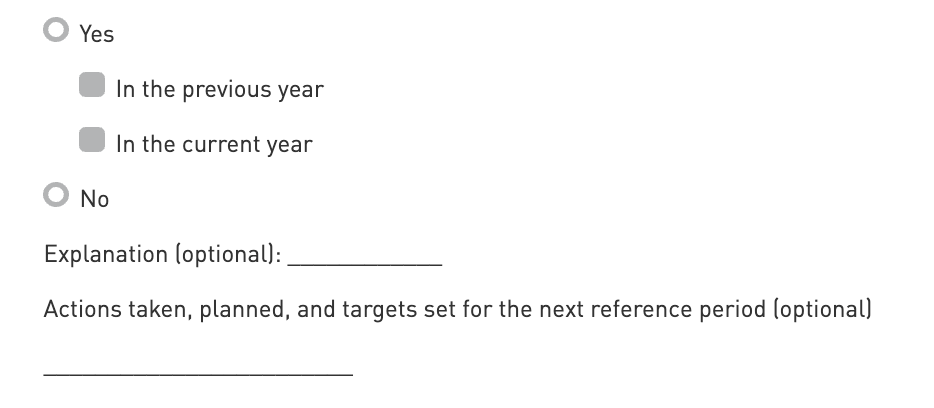
**Select Yes or No**
**Previous Year (2024):** Select 'Yes' to this option if the PAI indicator was applicable to the previous reference period.
**Current Year (2025):** Select 'Yes' to this option if the PAI indicator is applicable to the current reference period.
**Explanation (optional):** Provide context to the answer that was provided. This helps investors gain an understanding of the methodologies and assumptions used.
**Action taken (optional):** Give context to the answer that was provided to explain any action that may have been taken within the last year, as well as any actions planned or targets set for the next reference period.
### Terminology
**Deforestation**
> Means the temporary or permanent human-induced conversion of forested land to non-forested land.
***
## References
References
[‘Living well, within the limits of our planet’ Paragraph 100 of Decision No 1386/2013/EU.](https://eur-lex.europa.eu/legal-content/EN/TXT/?uri=celex%3A32013D1386)
---
# Agent Instructions
This documentation is published with GitBook. GitBook is the documentation platform designed so that both humans and AI agents can read, navigate, and reason over technical content effectively. Learn more at gitbook.com.
## Querying This Documentation
If you need additional information that is not directly available in this page, you can query the documentation by asking a question.
Perform an HTTP GET request on the following URL with the `ask` and `goal` query parameters:
```
GET https://guides.gresb.com/sfdr-reporting-solution/2026-sfdr-asset-assessment/table-2-additional-climate-and-other-environment-related-indicators/indicator-15-deforestation.md?ask=&goal=
```
`ask` is the immediate question: it should be specific, self-contained, and written in natural language.
`goal` is what the user is ultimately trying to achieve, the reason they need the answer. Sharing it helps GitBook give you a better, more relevant answer. A goal is most helpful when it describes the outcome the user wants rather than restating the question. For example, with `ask=how do I create an API token`, a goal like `automate deployments from our CI pipeline` lets GitBook tailor the answer to that use case.
The response will contain a direct answer to the question and relevant excerpts and sources from the documentation.
Use this mechanism when the answer is not explicitly present in the current page, you need clarification or additional context, or you want to retrieve related documentation sections.