# WS1: Waste Generation

## Assessment Instructions

{% hint style="info" %}

<p align="center">Participants must report this metric at the <strong>asset level.</strong> </p>

<p align="center">GRESB automatically populates this indicator in the assessment response once participants have aggregated asset-level data from the Asset Portal. </p>

<p align="center">When using the <strong>Asset Spreadsheet</strong> to upload asset-level data, GRESB recommends reviewing the instructions below in conjunction with the corresponding spreadsheet tab. The <em><strong>Cell Code</strong></em> column in the <em><strong>Input</strong></em> section indicates where to report each metric in the spreadsheet.</p>

<p align="center"><a href="/pages/EZGzv4iHHWr3QupL3836" class="button secondary" data-icon="gear">Asset Portal Guide</a><br><br><em>Click</em> <a href="https://cdn.svc.gresb.com/gresb-prd-public/2026/Real_Estate_Documents/2026_Real_Estate_Asset_Spreadsheet.xlsx"><em>here</em></a> <em>to download a read-only version of the Asset Spreadsheet.</em></p>
{% endhint %}

***

<figure><img src="/files/d8b5C6wYqmzPuYbpa7OX" alt="" width="375"><figcaption></figcaption></figure>

<details>

<summary><strong>Input</strong>: How do I complete this metric?</summary>

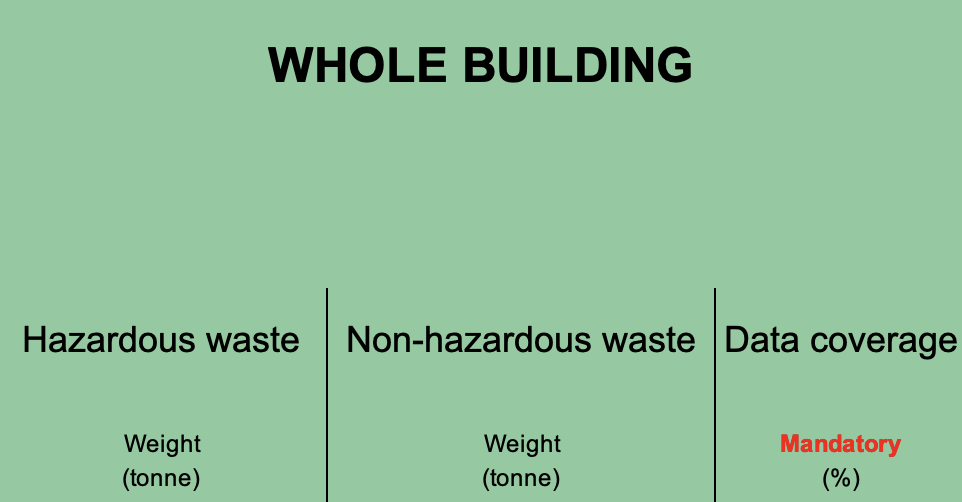
**Assets can only report waste at the Whole Building level.**

<table data-header-hidden><thead><tr><th width="125.83203125"></th><th width="94.328125" align="center"></th><th></th></tr></thead><tbody><tr><td><i class="fa-chart-simple">:chart-simple:</i> <mark style="background-color:$primary;"><strong>Data</strong></mark> </td><td align="center"><i class="fa-file-xls">:file-xls:</i> <mark style="background-color:$primary;"><strong>Cell Code</strong></mark></td><td><i class="fa-message-pen">:message-pen:</i> <mark style="background-color:$primary;"><strong>Instructions</strong></mark></td></tr><tr><td><strong>Hazardous and non-hazardous waste</strong></td><td align="center">G6-H6</td><td><p>Report the absolute hazardous and non-hazardous waste weight generated by the asset for both reporting years.</p><p></p><p></p><ul><li><i class="fa-circle-info">:circle-info:</i> <strong>Generation Value</strong>: Participants must report known absolute waste generation for a given space, regardless of the % of ownership. If the area produces waste but the quantity is unknown, leave this field empty. See <a href="#examples">examples</a> below.</li><li><i class="fa-circle-info">:circle-info:</i> <strong>Estimation</strong>: Participants must use actual data (non-estimated). However, GRESB allows asset-level estimates under specific conditions outlined in the <a href="/pages/PTymeFAEMqC3nYf0KrfS">Data Quality &#x26; Validation </a>page when actual data is <strong>partially</strong> unavailable.</li></ul><p></p><p>See definitions for waste types below:</p><p></p><ul><li><strong>Hazardous waste:</strong> A solid waste, or combination of solid wastes, which, because of its quantity, concentration, or physical/chemical/infectious characteristic,s may either cause, or significantly contribute to an increase in mortality/serious irreversible illness. Hazardous waste might also pose a substantial present or potential hazard to human health or the environment when improperly treated, stored, transported, disposed of, or otherwise managed.</li><li><strong>Non-hazardous waste:</strong> Waste that does not have the potential to cause harm to humans, animals, or the environment.</li></ul></td></tr><tr><td><strong>Data coverage</strong><br><br><strong>*</strong><em><mark style="background-color:$warning;">Mandatory</mark></em></td><td align="center">I6</td><td>Calculate data coverage based on waste data availability in the reporting year and the period prior to it.<br><br>Data coverages are calculated by dividing the floor area covered (for which waste data is available) by the maximum floor area (for which waste is generated and could have been collected).<br><br>Formula: [Data coverage] = [Floor Area Covered] / [Maximum Floor Area]</td></tr></tbody></table>

</details>

<details>

<summary><strong>Validation</strong>: What evidence is required?</summary>

This indicator is subject to automatic validation. No evidence is required.\
\
Refer to the page below for guidance on how to resolve automatic validation errors and warnings.\
\ <a href="/pages/h6Dr17lqUK5155DATJ9E" class="button primary" data-icon="shield-check">Validation Basics</a>

</details>

***

## Scoring

{% hint style="info" %}
*Waste consumption influences the **data coverage** (2 points total) score calculation.*
{% endhint %}

<details>

<summary>Data Coverage</summary>

**Step 1: Score Each Asset**

GRESB compares asset-level data coverage (*calculated based on the area for which data is available*) against a relevant benchmark distribution based on the same property sub-type and country, and specific to landlord-controlled and tenant-controlled areas. The benchmark comparison determines the asset's score.

**Step 2: Aggregate to the Property Subtype | Country Level**

GRESB aggregates the asset-level scores to each property sub-type and country combination, using a weighted mean calculated by multiplying floor area by the percentage of ownership and the length of ownership period in the reporting year.

**Step 3: Aggregate to the Portfolio Level**

GRESB aggregates the scores for each property sub-type and country into a single portfolio score, weighted by the gross asset value (GAV) for each property sub-type and country.

</details>

## Frequently Asked Questions

<details>

<summary>How should I convert volume to waste?</summary>

GRESB does not prescribe a specific conversion factor, since entities themselves will have better waste composition data to inform this choice.&#x20;

Please see this list of volume-weight conversion factors from the UN EPA, which might be useful to participants: Volume-to-Weight Conversion Factors, April 2016 (epa.gov)

</details>

<details>

<summary>How does GRESB construct the benchmarks used to score performance metrics?</summary>

First, an attempt is made to construct a benchmark by grouping values from assets with the same Property Sub-Type and located in the same Country. If there are not at least 20 values from 5 distinct reporting entities, the Property Sub-Type classification and then the Country specificity are gradually decreased.&#x20;

For example, the Property Sub-Type becomes Property Type and then Property Sector. Then the specificity of the Country is decreased to Sub-Region, Region, Super-Region, and Global.

</details>

<details>

<summary>It isn't feasible to obtain tenant-controlled consumption data. Will this penalize my results, and how does GRESB ensure fair benchmarking across landlord controlled and tenant controlled areas?</summary>

Participants must report tenant-controlled data coverage and consumption where available. If tenant-controlled data is not available, corresponding data coverage scores will reflect this. GRESB recognizes that this may be challenging in some scenarios.&#x20;

GRESB's methodology mitigates this by scoring and benchmarking data coverage and like-for-like metrics *separately* for tenant-controlled and landlord-controlled spaces.&#x20;

In doing so, entities that struggle to retrieve tenant consumption data are fairly compared with other assets within the same country and property type facing similar barriers. Conversely, entities that successfully capture accurate performance data for tenant-controlled spaces can achieve more favorable benchmarking outcomes and establish themselves as industry leaders.

</details>

## Get Support: Solution Providers

**GRESB Solution Providers** are independent, third-party organizations within the GRESB Partner network that offer specialized products, tools, and services to support sustainability performance outside the GRESB Assessment process.

The organizations below deliver commercially available solutions designed to help drive improvement for this indicator. Engagement is managed directly between the reporting entity and the Solution Provider.

GRESB will continue to update this section as the GRESB Solution Provider network grows. Please check back regularly to find GRESB Solution Providers who can support your sustainability performance.

<table data-view="cards"><thead><tr><th></th><th data-hidden data-card-cover data-type="image">Cover image</th><th data-hidden></th><th data-hidden></th></tr></thead><tbody><tr><td><a href="https://www.gresb.com/partners/arc/">See Directory Profile</a></td><td><a href="/files/qCwIJPMETRWb1WHqU2Jp">/files/qCwIJPMETRWb1WHqU2Jp</a></td><td>Arc Perform</td><td></td></tr><tr><td><a href="https://www.gresb.com/partners/carrot/">See Directory Profile</a></td><td data-object-fit="contain"><a href="/files/hKor50w96NXvdSL4p90t">/files/hKor50w96NXvdSL4p90t</a></td><td>Carrot</td><td></td></tr><tr><td><a href="https://www.gresb.com/partners/garc-holding-spa-societa-benefit/">See Directory Profile</a></td><td><a href="/files/xYMqbv56O4HNGjuboEba">/files/xYMqbv56O4HNGjuboEba</a></td><td></td><td>GARC Holding</td></tr><tr><td><a href="https://www.gresb.com/partners/ktv-working-drone-thailand/">See Directory Profile</a></td><td data-object-fit="contain"><a href="/files/nXUT4zFqylGQutqLpMIE">/files/nXUT4zFqylGQutqLpMIE</a></td><td>KTV Working Drone</td><td></td></tr></tbody></table>


---

# Agent Instructions: Querying This Documentation

If you need additional information that is not directly available in this page, you can query the documentation dynamically by asking a question.

Perform an HTTP GET request on the current page URL with the `ask` query parameter:

```
GET https://guides.gresb.com/completingassessments/2026-real-estate-assessment/re/perf/ws/ws1-waste-generation.md?ask=<question>
```

The question should be specific, self-contained, and written in natural language.
The response will contain a direct answer to the question and relevant excerpts and sources from the documentation.

Use this mechanism when the answer is not explicitly present in the current page, you need clarification or additional context, or you want to retrieve related documentation sections.